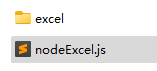
Place the script beside a folder named excel:
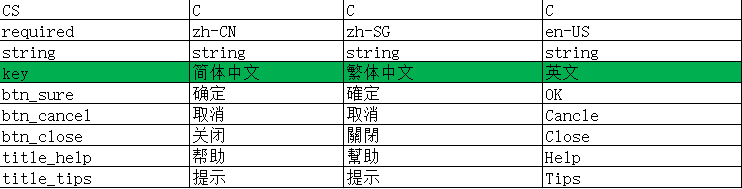
Example spreadsheet:
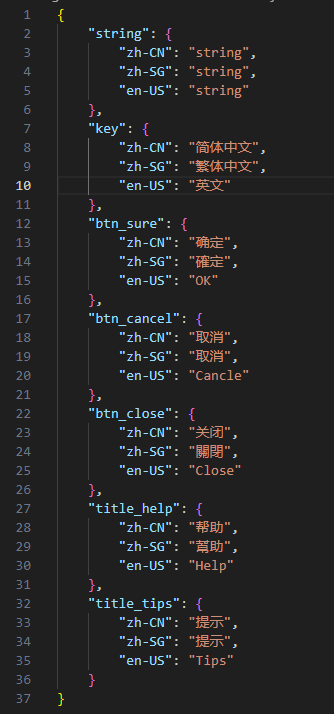
Generated JSON:
Install the dependency first:
Then use this script:
 1
 2
 3
 4
 5
 6
 7
 8
 9
10
11
12
13
14
15
16
17
18
19
20
21
22
23
24
25
26
27
28
29
30
31
32
33
34
35
36
37
38
39
40
| const path = require('path');
const fs = require('fs');
const xlsx = require('node-xlsx');
const excelDirectory = path.join(__dirname, 'excel');
fs.readdir(excelDirectory, (readError, files) => {
if (readError) throw readError;
for (const filename of files) {
if (!/\.xlsx?$/i.test(filename)) continue;
const sourcePath = path.join(excelDirectory, filename);
const workbook = xlsx.parse(sourcePath);
const rows = workbook[0].data;
if (rows.length < 2) continue;
const headers = rows[1];
const result = {};
for (let rowIndex = 2; rowIndex < rows.length; rowIndex++) {
const row = rows[rowIndex];
const key = row[0];
if (key === undefined || key === null || key === '') continue;
result[key] = {};
for (let column = 1; column < headers.length; column++) {
result[key][headers[column]] = row[column];
}
}
const outputName = `${path.parse(filename).name}.json`;
const outputPath = path.join(excelDirectory, outputName);
fs.writeFile(outputPath, JSON.stringify(result), writeError => {
if (writeError) throw writeError;
console.log(`Created ${outputName}`);
});
}
});
|
This version filters for Excel files, uses the first data column as each object’s key, and uses the header row for property names. Adjust the header and starting-row indexes to match your workbook structure.